Error processing SSI file
FAQ FSFAQ6: Dubbing Tapes

Search Support
Can't find an answer to your question? Contact us.
© 2004 Quik Scout Technologies. All Rights Reserved.
FAQ FSFAQ6: Dubbing Tapes
Created: 2/4/04
Last Updated: 5/24/04
Products: FireScout
Sports: All
Version: All
OS: Windows® XP
Questions or comments about a FAQ? Contact us.
QUESTION:
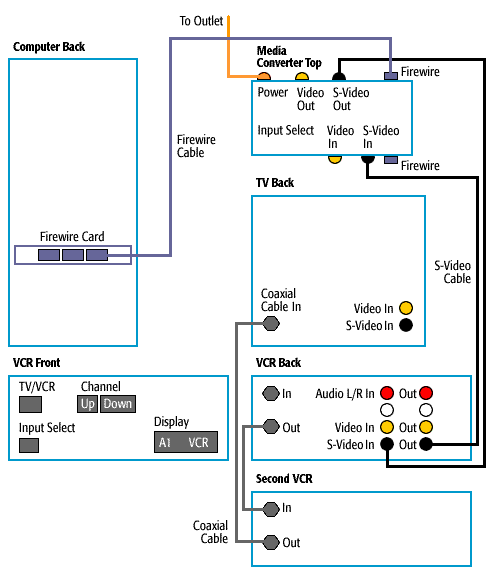
If I have more than one VCR, how can I connect my VCRs to dub tapes while I'm capturing video on my computer?
ANSWER:
- Using the diagram below, plug your VCRs together using coax cables. Plug VCR 1 into VCR 2 the way it's labeled.
- The last VCR in your chain should have a cable plugged from its Coax Out to the TV's Coax In.
- Each VCR should be on Channel 3 with the exception of the first VCR in the chain, which should be L1, Line 1, Aux, etc. If VCR does not display on the face of the additional VCRs, press the TV/VCR button. See your VCR's User's Guide for more information on how to change channels and inputs.