Error processing SSI file
FAQ FSFAQ5: Capturing video from VCR

Search Support
Can't find an answer to your question? Contact us.
© 2004 Quik Scout Technologies. All Rights Reserved.
FAQ FSFAQ5: Capturing video from VCR
Created: 2/4/04
Last Updated: 5/3/04
Products: FireScout
Sports: All
Version: All
OS: Windows® XP
Questions or comments about a FAQ? Contact us.
QUESTION:
I followed the directions in the User's Guide on how to capture video, but I am unable to capture video from my VCR to my computer. What do I do now?
ANSWER:
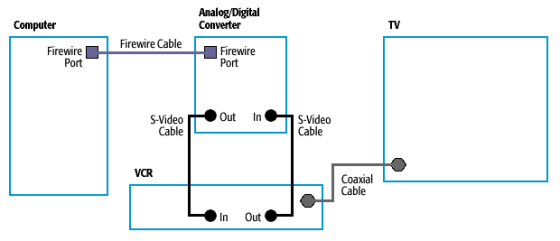
- Compare the diagram below to your wiring setup. Verify that your cables are connected correctly. Please note that composite cables (yellow, red, and white) may be used in place of the S-video cables. You can use this composite wiring diagram to check your composite cable set up.
- Verify that your media converter is turned on and in Analog In mode. Most converters have a button that allows you to select the input, Analog In or Digital In.
- Verify that your VCR is functioning properly.
- Verify that your VCR is turned on.
- Play a tape to make sure the Play button is working.
- Play your game tape to make sure that something is recorded and that the videotape is in working condition.
- Record a TV broadcast for a minute or so to verify that the Record button is functioning. Rewind the tape and play it to see if anything was recorded.
- Replace the S-video (or composite) cables to verify that the wires have no damage that may impede their use.