FireScout Setup
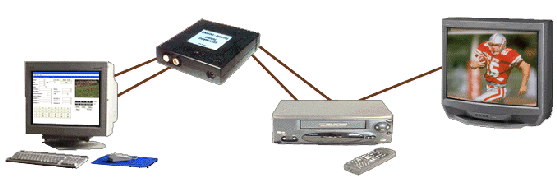
FireScout uses the latest cutting-edge FireWire® technology. If you have a digital video camera with FireWire®, you can connect it directly to your computer, eliminating the need for a converter. If not, you can use the analog-to-digital converter setup shown below to capture game video and to create highlight tapes.
Setup Using a Converter
Your current VCR easily attaches to an analog-to-digital converter using cables supplied with the unit. The converter then attaches to your PC (desktop or laptop) using FireWire® cable. Your computer captures game video from your VCR, converts it from an analog format to a digital format, and then copies it to your computer's hard drive, where it is ready for you to edit. After editing, you can send the newly-created video clips back to your VCR for duplication and viewing by coaches and players.